 WhatsApp
 Facebook
 YouTube
DISPLAY ILI9341
✓ Compatible and tested
- ATS25 *
- ATS25+ *
- ATS25X1 / ATS25X2 *
- ATS25 max *
- ATS25 DIY *
- ATS25 mod decode
- ATS25 DIY (with decoder)
- ATS25 max-Decoder
- ATS25 max-Decoder II
- ATS25-XF
- ATS25AMP
GOLDENRADIO is the reference firmware for ATS25. It turns your portable receiver into a complete tool for SWLs, DXers and radio amateurs, with separate management of HAM and BROADCAST bands, quick access to the main radio bands, and AIR and VHF support on compatible models. Marine-band and additional VHF support are also planned.
It includes FT2, FT4 and FT8 decoding, the built-in JTTY text decoder, CW, RTTY, WEFAX and SSTV image reception. WSPR is coming soon. Other digital modes in development include JS8Call, NAVTEX, Hellschreiber, PSK31 and PSK63.
In FTx modes, when a locator is available, GOLDENRADIO shows the country, distance and antenna bearing, and plots each decoded station on a world map. It also includes Touch & Tune, 100 memories per band, an integrated EiBi database and per-band frequency calibration. GoldenRadio Settings Manager lets you save and restore settings directly from the browser or with a Windows program, and will be further developed in upcoming versions. The full list of supported models is below.
Download the latest GOLDENRADIO firmware and install it directly from your browser over USB. You can try it free with every feature active: without a licence, an activation reminder appears occasionally, but the radio continues to work fully.
GOLDENRADIO runs on these ATS25 models. During installation you'll be asked for your radio's model, so the correct firmware version for its display gets installed.
On these models GOLDENRADIO installs and works normally for tuning, memories, the EiBi database and other basic functions. However, the digital decoders — FT2, FT4, FT8, CW, RTTY, SSTV and WEFAX — are unavailable: their menu buttons remain disabled, while spectrum and waterfall show only noise without a usable signal.
This is because these models do not include the decoder circuit, a small internal board that takes the receiver audio and feeds it to the microcontroller for processing. The decoder circuit can still be added to any model with a simple modification, which will be published soon.
GOLDENRADIO is the only firmware that plots the positions of stations received in FT2, FT4 and FT8 on a map, showing their distance in kilometres and the antenna bearing towards each one. The map can also display the grey line: the boundary between day and night where radio amateurs know propagation can favour longer-distance contacts.
The only ESP32-based firmware that decodes the callsign prefix in FT2, FT4 or FT8 and instantly shows the country of origin of the signal. DX hunting has never been this immediate.
When you update GOLDENRADIO from the website, all settings and memories are retained automatically. GoldenRadio Manager (GRM) also lets you do this at any time, online or offline, choosing what to save or restore — settings, memories, WiFi networks, the EiBi database and the activation key.
Adaptive spectrum analyzer with waterfall lets you "see" weak signals your ears might miss. FT8 decoding over a full 3 kHz bandwidth — double what stock firmware offers.
Install the latest firmware for ATS25 directly from your browser over USB. No downloads, no extra software — the web installer does all the work.
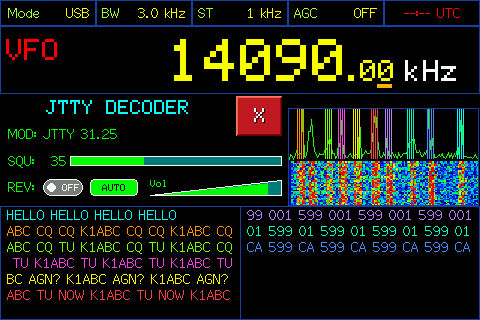
JTTY text decoder integrated into the radio, adaptive CW decoder with Goertzel filter, multi-standard RTTY with Touch & Tune, WEFAX weather images, SSTV image reception, integrated EiBi database and 100 memories per band.
You can try GOLDENRADIO with every feature active and no restrictions. An activation reminder appears occasionally but does not prevent you from using the radio. Activate the licence to stop seeing it.
Short messages from the GOLDENRADIO WhatsApp community.
Connect the radio over USB, open the installation page and follow the instructions.
After installation, press "Set" on the radio to open the settings, then press "Info" to read your device Product ID.
Click Activate Licence and follow the instructions. You will receive an email with the keys needed to activate your radios permanently.
Screenshots of GOLDENRADIO in operation.
| Digital modes | FT2, FT4, FT8, JTTY, adaptive CW, multi-standard RTTY, WEFAX and SSTV image reception. Coming soon: WSPR. In development: JS8Call, NAVTEX, Hellschreiber, PSK31, PSK63 |
| Hardware | ESP32 + Si4732 / Si4735, ILI9341, ST7789, ILI9488i or ILI9488 display depending on the model |
| Compatibility | ATS25 max-Decoder II; ATS25 max-Decoder; ATS25 / ATS25+ / ATS25X1 / ATS25X2 / ATS25 max; ATS25-XF; ATS25AMP; ATS25 with digital modes modifications; ATS25 Pro+ AIR; ATS25 Ultra; ATS-Decoder Mega. In progress: ATS25 max-Decoder II AIR, ATS-Decoder Pocket, ATS-Decoder Mega AIR, ATS120, ATS120D, ATS120 Pro, ATS200, ATS200D, ARESQ aq1 |
| Flash method | Chrome/Edge web browser over USB, with no additional software |
| Activation signing | HMAC — SHA-256 |
| Key delivery | Automatic email after activation |
| Payment | Stripe and PayPal: Visa, Mastercard, AMEX, SEPA where available |
| Updates | Included: return to the installation page and load the latest available version |